

R2 Data Catalog, a managed Apache Iceberg ↗ catalog built into R2, now removes unreferenced data files during automatic snapshot expiration. This improvement reduces storage costs and eliminates the need to run manual maintenance jobs to reclaim space from deleted data.
Previously, snapshot expiration only cleaned up Iceberg metadata files such as manifests and manifest lists. Data files that were no longer referenced by active snapshots remained in R2 storage until you manually ran
remove_orphan_filesorexpire_snapshotsthrough an engine like Spark. This required extra operational overhead and left stale data files consuming storage.Snapshot expiration now handles both metadata and data file cleanup automatically. When a snapshot is expired, any data files that are no longer referenced by retained snapshots are removed from R2 storage.
Terminal window # Enable catalog-level snapshot expirationnpx wrangler r2 bucket catalog snapshot-expiration enable my-bucket \--older-than-days 7 \--retain-last 10To learn more about snapshot expiration and other automatic maintenance operations, refer to the table maintenance documentation.
Workflows now provides additional context inside
step.do()callbacks and supports returningReadableStreamto handle larger step outputs.The
step.do()callback receives a context object with new properties alongsideattempt:step.name— The name passed tostep.do()step.count— How many times a step with that name has been invoked in this instance (1-indexed)- Useful when running the same step in a loop.
config— The resolved step configuration, includingtimeoutandretrieswith defaults applied
TypeScript type ResolvedStepConfig = {retries: {limit: number;delay: WorkflowDelayDuration | number;backoff?: "constant" | "linear" | "exponential";};timeout: WorkflowTimeoutDuration | number;};type WorkflowStepContext = {step: {name: string;count: number;};attempt: number;config: ResolvedStepConfig;};Steps can now return a
ReadableStreamdirectly. Although non-stream step outputs are limited to 1 MiB, streamed outputs support much larger payloads.TypeScript const largePayload = await step.do("fetch-large-file", async () => {const object = await env.MY_BUCKET.get("large-file.bin");return object.body;});Note that streamed outputs are still considered part of the Workflow instance storage limit.
The Container logs page now displays related Worker and Durable Object logs alongside container logs. This co-locates all relevant log events for a container application in one place, making it easier to trace requests and debug issues.
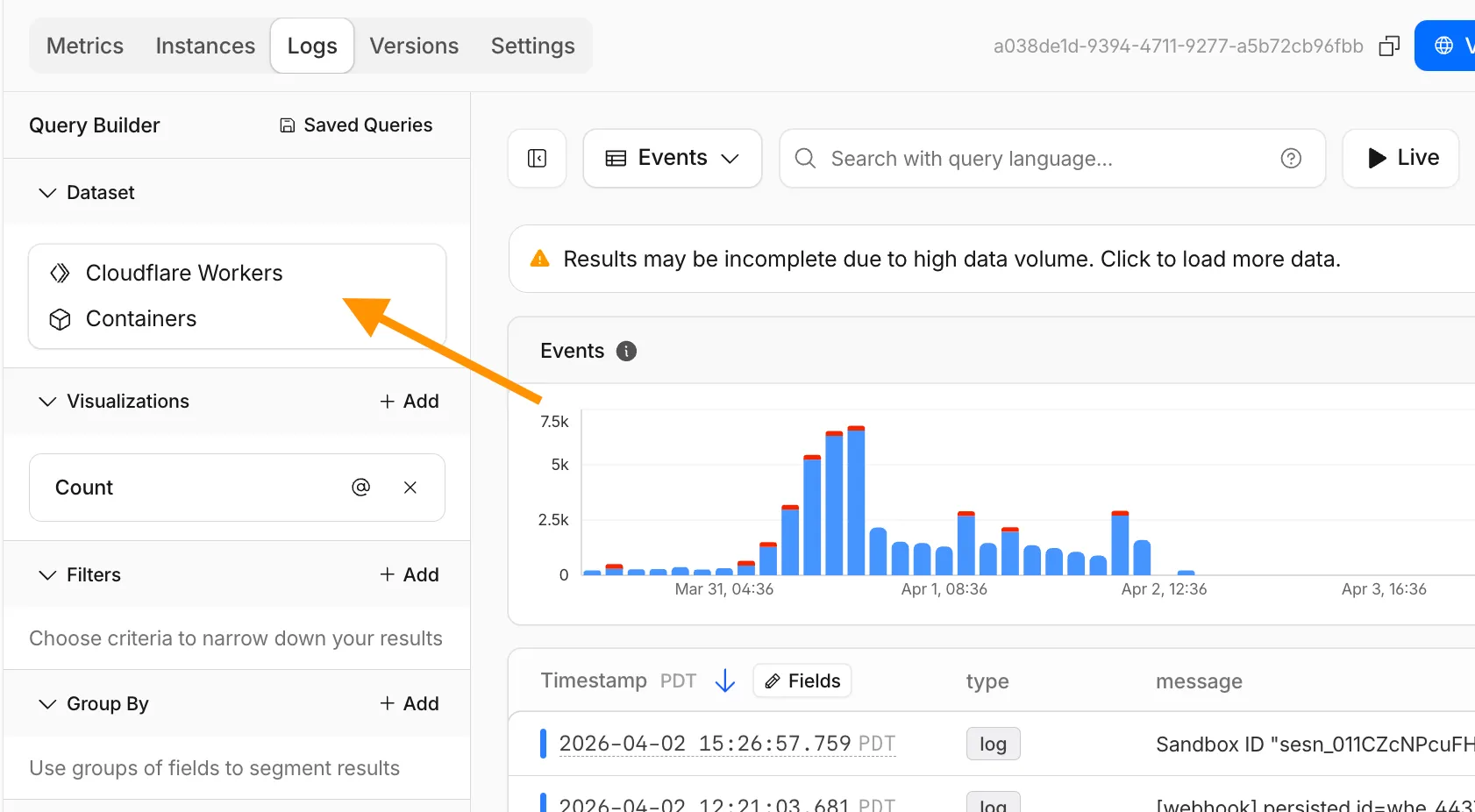
You can filter to a single source when you need to isolate Container, Worker, or Durable Object output.
For information on configuring container logging, refer to How do Container logs work?.
Pay-as-you-go customers can now monitor usage-based costs and configure spend alerts through two new features: the Billable Usage dashboard and Budget alerts.
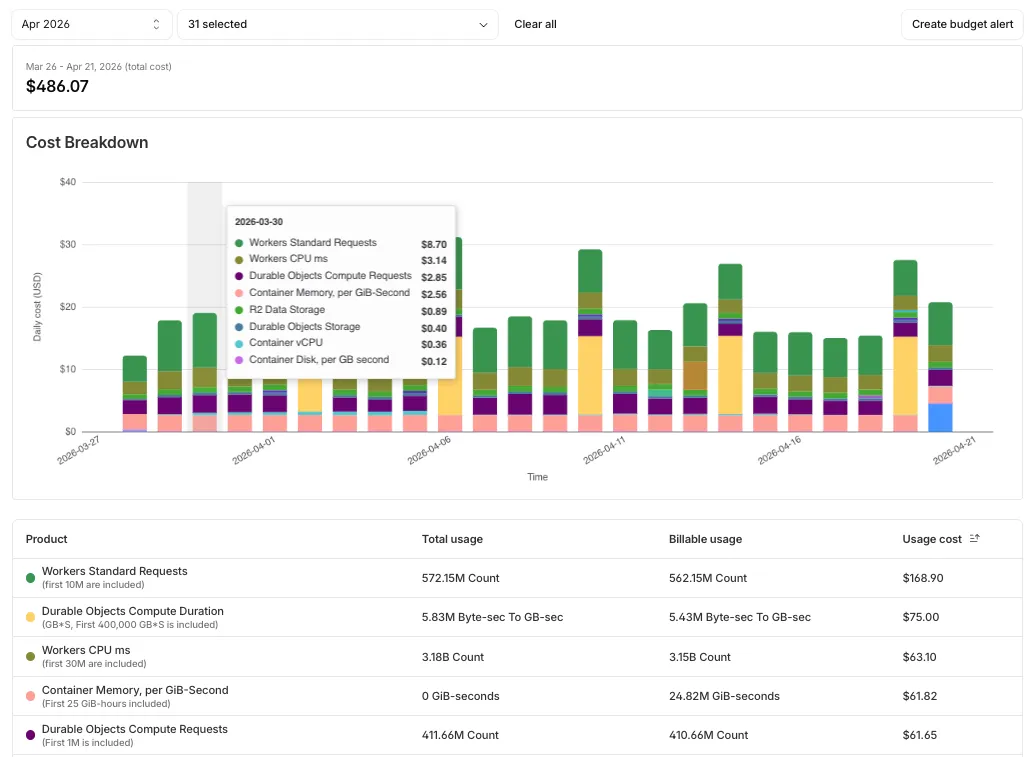
The Billable Usage dashboard provides daily visibility into usage-based costs across your Cloudflare account. The data comes from the same system that generates your monthly invoice, so the figures match your bill.
The dashboard displays:
- A bar chart showing daily usage charges for your billing period
- A sortable table breaking down usage by product, including total usage, billable usage, and cumulative costs
- Ability to view previous billing periods
Usage data aligns to your billing cycle, not the calendar month. The total usage cost shown at the end of a completed billing period matches the usage overage charges on your corresponding invoice.
To access the dashboard, go to Manage Account > Billing > Billable Usage.
Budget alerts allow you to set dollar-based thresholds for your account-level usage spend. You receive an email notification when your projected monthly spend reaches your configured threshold, giving you proactive visibility into your bill before month-end.
To configure a budget alert:
- Go to Manage Account > Billing > Billable Usage.
- Select Set Budget Alert.
- Enter a budget threshold amount greater than $0.
- Select Create.
Alternatively, configure alerts via Notifications > Add > Budget Alert.
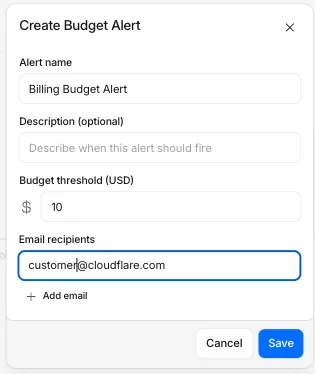
You can create multiple budget alerts at different dollar amounts. The notifications system automatically deduplicates alerts if multiple thresholds trigger at the same time. Budget alerts are calculated daily based on your usage trends and fire once per billing cycle when your projected spend first crosses your threshold.
Both features are available to Pay-as-you-go accounts with usage-based products (Workers, R2, Images, etc.). Enterprise contract accounts are not supported.
For more information, refer to the Usage based billing documentation.
When a Cloudflare Worker intercepts a visitor request, it can dispatch additional outbound fetch calls called subrequests. By default, each subrequest generates its own log entry in Logpush, resulting in multiple log lines per visitor request. With subrequest merging enabled, subrequest data is embedded as a nested array field on the parent log record instead.
- New subrequest_merging field on Logpush jobs — Set "merge_subrequests": true when creating or updating an http_requests Logpush job to enable the feature.
- New Subrequests log field — When subrequest merging is enabled, a Subrequests field (
array\<object\>) is added to each parent request log record. Each element in the array contains the standard http_requests fields for that subrequest.
- Applies to the http_requests (zone-scoped) dataset only.
- A maximum of 50 subrequests are merged per parent request. Subrequests beyond this limit are passed through unmodified as individual log entries.
- Subrequests must complete within 5 minutes of the visitor request. Subrequests that exceed this window are passed through unmodified.
- Subrequests that do not qualify appear as separate log entries — no data is lost.
- Subrequest merging is being gradually rolled out and is not yet available on all zones. Contact your account team for concerns or to ensure it is enabled for your zone.
- For more information, refer to Subrequests.
This week's release introduces a new detection for a Remote Code Execution (RCE) vulnerability in Apache ActiveMQ (CVE-2026-34197) and an updated signature for Magento 2 - Unrestricted File Upload. Alongside these detections, we are continuing our work on rule refinements to provide deeper security insights for our customers.
Key Findings
-
Apache ActiveMQ (CVE-2026-34197): A vulnerability in Apache ActiveMQ allows an unauthenticated, remote attacker to execute arbitrary code. This flaw occurs during the processing of specially crafted network packets, leading to potential full system compromise.
-
Magento 2 - Unrestricted File Upload - 2: This is a follow-up enhancement to our existing protections for Magento and Adobe Commerce.
Impact
Successful exploitation of these vulnerabilities could allow unauthenticated attackers to execute arbitrary code or gain full administrative control over affected servers. We strongly recommend applying official vendor patches for Apache ActiveMQ and Magento to address the underlying vulnerabilities.
Continuous Rule Improvements
We are continuously refining our managed rules to provide more resilient protection and deeper insights into attack patterns. To ensure an optimal security posture, we recommend consistently monitoring the Security Events dashboard and adjusting rule actions as these enhancements are deployed.
Ruleset Rule ID Legacy Rule ID Description Previous Action New Action Comments Cloudflare Managed Ruleset N/A Command Injection - Generic 8 - uri Log Block This is a new detection. Previous description was "Command Injection - Generic 8 - uri - Beta" Cloudflare Managed Ruleset N/A Command Injection - Generic 8 - body Disabled Disabled Rule metadata description refined. Previous description was "Command Injection - Generic 8" (ID:
Cloudflare Managed Ruleset N/A Command Injection - Generic 8 - body - Beta Disabled Disabled This is a new detection. This rule is merged into the original rule "Command Injection - Generic 8 - body" (ID:
Cloudflare Managed Ruleset N/A MySQL - SQLi - Executable Comment - Body Block Block Rule metadata description refined. Previous description was "MySQL - SQLi - Executable Comment" (ID:
Cloudflare Managed Ruleset N/A MySQL - SQLi - Executable Comment - Beta Log Block This is a new detection. This rule is merged into the original rule "MySQL - SQLi - Executable Comment - Body" (ID:
Cloudflare Managed Ruleset N/A MySQL - SQLi - Executable Comment - Headers Log Block This is a new detection.
Cloudflare Managed Ruleset N/A MySQL - SQLi - Executable Comment - URI Log Block This is a new detection.
Cloudflare Managed Ruleset N/A Magento 2 - Unrestricted file upload - 2 Log Block This is a new detection.
Cloudflare Managed Ruleset N/A Apache ActiveMQ - Remote Code Execution - CVE:CVE-2026-34197 Log Block This is a new detection.
Cloudflare Managed Ruleset N/A SQLi - Sleep Function - Beta Log Block This is a new detection. This rule is merged into the original rule "SQLi - Sleep Function" (ID:
Cloudflare Managed Ruleset N/A SQLi - Sleep Function - Headers Log Block This is a new detection.
Cloudflare Managed Ruleset N/A SQLi - Sleep Function - URI Log Block This is a new detection.
Cloudflare Managed Ruleset N/A SQLi - Probing - uri Log Block This is a new detection.
Cloudflare Managed Ruleset N/A SQLi - Probing - header Log Block This is a new detection.
Cloudflare Managed Ruleset N/A SQLi - Probing - body Disabled Disabled This is a new detection. This rule is merged into the original rule "SQLi - Probing" (ID:
Cloudflare Managed Ruleset N/A SQLi - Probing 2 Disabled Disabled This rule had duplicate detection logic and has been deprecated.
Cloudflare Managed Ruleset N/A SQLi - UNION in MSSQL - Body Disabled Disabled This rule has been renamed to differentiate from "SQLi - UNION in MSSQL" (ID:
Cloudflare Managed Ruleset N/A SQLi - UNION - 3 Disabled Disabled This rule had duplicate detection logic and has been deprecated.
Cloudflare Managed Ruleset N/A XSS, HTML Injection - Embed Tag - URI Disabled Disabled This is a new detection.
Cloudflare Managed Ruleset N/A XSS, HTML Injection - Embed Tag - Headers Log Block This is a new detection.
Cloudflare Managed Ruleset N/A XSS, HTML Injection - IFrame Tag - Src and Srcdoc Attributes - Headers Log Disabled This is a new detection.
Cloudflare Managed Ruleset N/A XSS, HTML Injection - Link Tag - Headers Log Disabled This is a new detection.
Cloudflare Managed Ruleset N/A XSS, HTML Injection - Link Tag - URI Disabled Disabled This is a new detection.
-
Announcement Date Release Date Release Behavior Legacy Rule ID Rule ID Description Comments 2026-04-21 2026-04-27 Log N/A PostgreSQL - SQLi - COPY - Beta This is a new detection. This rule will be merged into the original rule "PostgreSQL - SQLi - COPY" (ID:
2026-04-21 2026-04-27 Log N/A PostgreSQL - SQLi - COPY - Headers This is a new detection. 2026-04-21 2026-04-27 Log N/A PostgreSQL - SQLi - COPY - URI This is a new detection. 2026-04-21 2026-04-27 Log N/A SQLi - Destructive Operations This is a new detection.
2026-04-21 2026-04-27 Log N/A SQLi - AND/OR MAKE_SET/ELT - Beta This is a new detection. This rule will be merged into the original rule "SQLi - AND/OR MAKE_SET/ELT" (ID:
2026-04-21 2026-04-27 Log N/A SQLi - AND/OR MAKE_SET/ELT - Headers This is a new detection. 2026-04-21 2026-04-27 Log N/A SQLi - AND/OR MAKE_SET/ELT - URI This is a new detection. 2026-04-21 2026-04-27 Log N/A SQLi - Common Patterns - Beta This is a new detection. This rule will be merged into the original rule "SQLi - Common Patterns" (ID:
2026-04-21 2026-04-27 Log N/A SQLi - Common Patterns - Headers This is a new detection. 2026-04-21 2026-04-27 Log N/A SQLi - Common Patterns - URI This is a new detection. 2026-04-21 2026-04-27 Log N/A SQLi - Equation - Beta This is a new detection. This rule will be merged into the original rule "SQLi - Equation" (ID:
2026-04-21 2026-04-27 Log N/A SQLi - Equation - Headers This is a new detection. 2026-04-21 2026-04-27 Log N/A SQLi - Equation - URI This is a new detection. 2026-04-21 2026-04-27 Log N/A SQLi - AND/OR Digit Operator Digit - Beta This is a new detection. This rule will be merged into the original rule "SQLi - AND/OR Digit Operator Digit" (ID:
2026-04-21 2026-04-27 Log N/A SQLi - AND/OR Digit Operator Digit - Headers This is a new detection. 2026-04-21 2026-04-27 Log N/A SQLi - AND/OR Digit Operator Digit - URI This is a new detection. 2026-04-21 2026-04-27 Log N/A SQLi - Benchmark Function - Beta This is a new detection. This rule will be merged into the original rule "SQLi - Benchmark Function" (ID:
2026-04-21 2026-04-27 Log N/A SQLi - Benchmark Function - Headers This is a new detection. 2026-04-21 2026-04-27 Log N/A SQLi - Benchmark Function - URI This is a new detection. 2026-04-21 2026-04-27 Log N/A SQLi - Comparison - Beta This is a new detection. This rule will be merged into the original rule "SQLi - Comparison" (ID:
2026-04-21 2026-04-27 Log N/A SQLi - Comparison - Headers This is a new detection. 2026-04-21 2026-04-27 Log N/A SQLi - Comparison - URI This is a new detection. 2026-04-21 2026-04-27 Log N/A SQLi - String Concatenation - Body - Beta This is a new detection. This rule will be merged into the original rule "SQLi - String Concatenation - Headers" (ID:
2026-04-21 2026-04-27 Log N/A SQLi - String Concatenation - Headers This is a new detection. 2026-04-21 2026-04-27 Log N/A SQLi - String Concatenation - URI This is a new detection. 2026-04-21 2026-04-27 Log N/A SQLi - SELECT Expression - Beta This is a new detection. This rule will be merged into the original rule "SQLi - SELECT Expression" (ID:
2026-04-21 2026-04-27 Log N/A SQLi - SELECT Expression - Headers This is a new detection. 2026-04-21 2026-04-27 Log N/A SQLi - SELECT Expression - URI This is a new detection. 2026-04-21 2026-04-27 Log N/A SQLi - ORD and ASCII - Beta This is a new detection. This rule will be merged into the original rule "SQLi - ORD and ASCII" (ID:
2026-04-21 2026-04-27 Log N/A SQLi - ORD and ASCII - Headers This is a new detection. 2026-04-21 2026-04-27 Log N/A SQLi - ORD and ASCII - URI This is a new detection. 2026-04-21 2026-04-27 Log N/A XSS, HTML Injection - Object Tag - Body (beta) This is a new detection. 2026-04-21 2026-04-27 Log N/A XSS, HTML Injection - Object Tag - Headers (beta) This is a new detection. 2026-04-21 2026-04-27 Log N/A XSS, HTML Injection - Object Tag - URI (beta) This is a new detection.
Binary frames received on a
WebSocketare now delivered to themessageevent asBlob↗ objects by default. This matches the WebSocket specification ↗ and standard browser behavior. Previously, binary frames were always delivered asArrayBuffer↗. ThebinaryTypeproperty onWebSocketcontrols the delivery type on a per-WebSocket basis.This change has been active for Workers with compatibility dates on or after
2026-03-17, via thewebsocket_standard_binary_typecompatibility flag. We should have documented this change when it shipped but didn't. We're sorry for the trouble that caused. If your Worker handles binary WebSocket messages and assumesevent.datais anArrayBuffer, the frames will arrive asBlobinstead, and a naiveinstanceof ArrayBuffercheck will silently drop every frame.To opt back into
ArrayBufferdelivery, assignbinaryTypebefore callingaccept(). This works regardless of the compatibility flag:JavaScript const resp = await fetch("https://example.com", {headers: { Upgrade: "websocket" },});const ws = resp.webSocket;// Opt back into ArrayBuffer delivery for this WebSocket.ws.binaryType = "arraybuffer";ws.accept();ws.addEventListener("message", (event) => {if (typeof event.data === "string") {// Text frame.} else {// event.data is an ArrayBuffer because we set binaryType above.}});If you are not ready to migrate and want to keep
ArrayBufferas the default for all WebSockets in your Worker, add theno_websocket_standard_binary_typeflag to your Wrangler configuration file.This change has no effect on the Durable Object hibernatable WebSocket
webSocketMessagehandler, which continues to receive binary data asArrayBuffer.For more information, refer to WebSockets binary messages.
The new Network session analytics dashboard is now available in Cloudflare One. This dashboard provides visibility into your network traffic patterns, helping you understand how traffic flows through your Cloudflare One infrastructure.
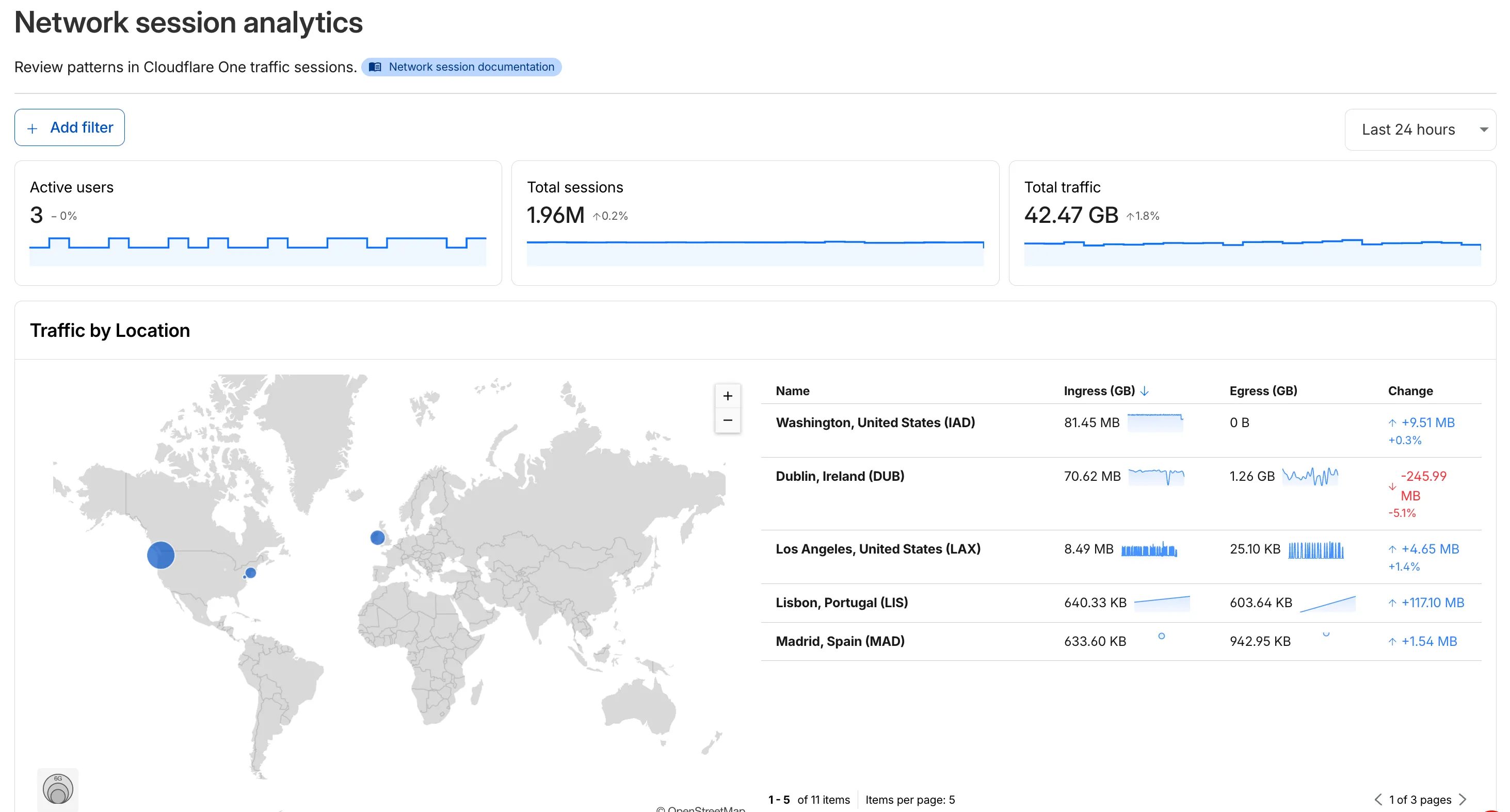
- Analyze geographic distribution: View a world map showing where your network traffic originates, with a list of top locations by session count.
- Monitor key metrics: Track session count, total bytes transferred, and unique users.
- Identify connection issues: Analyze connection close reasons to troubleshoot network problems.
- Review protocol usage: See which network protocols (TCP, UDP, ICMP) are most used.
- Summary metrics: Session count, bytes total, and unique users
- Traffic by location: World map visualization and location list with top traffic sources
- Top protocols: Breakdown of TCP, UDP, ICMP, and ICMPv6 traffic
- Connection close reasons: Insights into why sessions terminated (client closed, origin closed, timeouts, errors)
- Log in to Cloudflare One ↗.
- Go to Zero Trust > Insights > Dashboards.
- Select Network session analytics.
For more information, refer to the Network session analytics documentation.
Logpush has traditionally been great at delivering Cloudflare logs to a variety of destinations in JSON format. While JSON is flexible and easily readable, it can be inefficient to store and query at scale.
With this release, you can now send your logs directly to Pipelines to ingest, transform, and store your logs in R2 as Parquet files or Apache Iceberg tables managed by R2 Data Catalog. This makes the data footprint more compact and more efficient at querying your logs instantly with R2 SQL or any other query engine that supports Apache Iceberg or Parquet.
Pipelines SQL runs on each log record in-flight, so you can reshape your data before it is written. For example, you can drop noisy fields, redact sensitive values, or derive new columns:
INSERT INTO http_logs_sinkSELECTClientIP,EdgeResponseStatus,to_timestamp_micros(EdgeStartTimestamp) AS event_time,upper(ClientRequestMethod) AS method,sha256(ClientIP) AS hashed_ipFROM http_logs_streamWHERE EdgeResponseStatus >= 400;Pipelines SQL supports string functions, regex, hashing, JSON extraction, timestamp conversion, conditional expressions, and more. For the full list, refer to the Pipelines SQL reference.
To configure Pipelines as a Logpush destination, refer to Enable Cloudflare Pipelines.
R2 SQL is Cloudflare's serverless, distributed, analytics query engine for querying Apache Iceberg ↗ tables stored in R2 Data Catalog.
R2 SQL now supports functions for querying JSON data stored in Apache Iceberg tables, an easier way to parse query plans with
EXPLAIN FORMAT JSON, and querying tables without partition keys stored in R2 Data Catalog.JSON functions extract and manipulate JSON values directly in SQL without client-side processing:
SELECTjson_get_str(doc, 'name') AS name,json_get_int(doc, 'user', 'profile', 'level') AS level,json_get_bool(doc, 'active') AS is_activeFROM my_namespace.sales_dataWHERE json_contains(doc, 'email')For a full list of available functions, refer to JSON functions.
EXPLAIN FORMAT JSONreturns query execution plans as structured JSON for programmatic analysis and observability integrations:Terminal window npx wrangler r2 sql query "${WAREHOUSE}" "EXPLAIN FORMAT JSON SELECT * FROM logpush.requests LIMIT 10;"┌──────────────────────────────────────┐│ plan │├──────────────────────────────────────┤│ { ││ "name": "CoalescePartitionsExec", ││ "output_partitions": 1, ││ "rows": 10, ││ "size_approx": "310B", ││ "children": [ ││ { ││ "name": "DataSourceExec", ││ "output_partitions": 4, ││ "rows": 28951, ││ "size_approx": "900.0KB", ││ "table": "logpush.requests", ││ "files": 7, ││ "bytes": 900019, ││ "projection": [ ││ "__ingest_ts", ││ "CPUTimeMs", ││ "DispatchNamespace", ││ "Entrypoint", ││ "Event", ││ "EventTimestampMs", ││ "EventType", ││ "Exceptions", ││ "Logs", ││ "Outcome", ││ "ScriptName", ││ "ScriptTags", ││ "ScriptVersion", ││ "WallTimeMs" ││ ], ││ "limit": 10 ││ } ││ ] ││ } │└──────────────────────────────────────┘For more details, refer to EXPLAIN.
Unpartitioned Iceberg tables can now be queried directly, which is useful for smaller datasets or data without natural time dimensions. For tables with more than 1000 files, partitioning is still recommended for better performance.
Refer to Limitations and best practices for the latest guidance on using R2 SQL.
@cf/moonshotai/kimi-k2.6is now available on Workers AI, in partnership with Moonshot AI for Day 0 support. Kimi K2.6 is a native multimodal agentic model from Moonshot AI that advances practical capabilities in long-horizon coding, coding-driven design, proactive autonomous execution, and swarm-based task orchestration.Built on a Mixture-of-Experts architecture with 1T total parameters and 32B active per token, Kimi K2.6 delivers frontier-scale intelligence with efficient inference. It scores competitively against GPT-5.4 and Claude Opus 4.6 on agentic and coding benchmarks, including BrowseComp (83.2), SWE-Bench Verified (80.2), and Terminal-Bench 2.0 (66.7).
- 262.1k token context window for retaining full conversation history, tool definitions, and codebases across long-running agent sessions
- Long-horizon coding with significant improvements on complex, end-to-end coding tasks across languages including Rust, Go, and Python
- Coding-driven design that transforms simple prompts and visual inputs into production-ready interfaces and full-stack workflows
- Agent swarm orchestration scaling horizontally to 300 sub-agents executing 4,000 coordinated steps for complex autonomous tasks
- Vision inputs for processing images alongside text
- Thinking mode with configurable reasoning depth
- Multi-turn tool calling for building agents that invoke tools across multiple conversation turns
If you are migrating from Kimi K2.5, note the following API changes:
- K2.6 uses
chat_template_kwargs.thinkingto control reasoning, replacingchat_template_kwargs.enable_thinking - K2.6 returns reasoning content in the
reasoningfield, replacingreasoning_content
Use Kimi K2.6 through the Workers AI binding (
env.AI.run()), the REST API at/ai/run, or the OpenAI-compatible endpoint at/v1/chat/completions. You can also use AI Gateway with any of these endpoints.For more information, refer to the Kimi K2.6 model page and pricing.
Cloudflare's network now supports redirecting verified AI training crawlers to canonical URLs when they request deprecated or duplicate pages. When enabled via AI Crawl Control > Quick Actions, AI training crawlers that request a page with a canonical tag pointing elsewhere receive a 301 redirect to the canonical version. Humans, search engine crawlers, and AI Search agents continue to see the original page normally.
This feature leverages your existing
<link rel="canonical">tags. No additional configuration required beyond enabling the toggle. Available on Pro, Business, and Enterprise plans at no additional cost.Refer to the Redirects for AI Training documentation for details.
AI Crawl Control now includes new tools to help you prepare your site for the agentic Internet—a web where AI agents are first-class citizens that discover and interact with content differently than human visitors.
The Metrics tab now includes a Content Format chart showing what content types AI systems request versus what your origin serves. Understanding these patterns helps you optimize content delivery for both human and agent consumption.
The Robots.txt tab has been renamed to Directives and now includes a link to check your site's Agent Readiness ↗ score.
Refer to our blog post on preparing for the agentic Internet ↗ for more on why these capabilities matter.
You can now achieve higher cache HIT rates and reduce origin load for origins hosted on public cloud providers with Smart Tiered Cache. By setting a cloud region hint for your origin, Cloudflare selects the optimal upper-tier data center for that cloud region, funneling all cache MISSes through a single location close to your origin.
Previously, Smart Tiered Cache could not reliably select an optimal upper tier for origins behind anycast or regional unicast networks commonly used by cloud providers. Origins on AWS, GCP, Azure, and Oracle Cloud would fall back to a multi-upper-tier topology, resulting in lower cache HIT rates and more requests reaching your origin.
Set a cloud region hint (for example,
aws/us-east-1orgcp/europe-west1) for your origin IP or hostname. Smart Tiered Cache uses this hint along with real-time latency data to select a primary upper tier close to your cloud region, plus a fallback in a different location for resilience.- Supported providers: AWS, GCP, Azure, and Oracle Cloud.
- All plans: Available on Free, Pro, Business, and Enterprise plans at no additional cost.
- Dashboard and API: Configure from Caching > Tiered Cache > Origin Configuration, or use the API and Terraform.
To get started, enable Smart Tiered Cache and set a cloud region hint for your origin in the Tiered Cache settings.
Radar adds three new features to the AI Insights ↗ page, expanding visibility into how AI bots, crawlers, and agents interact with the web.
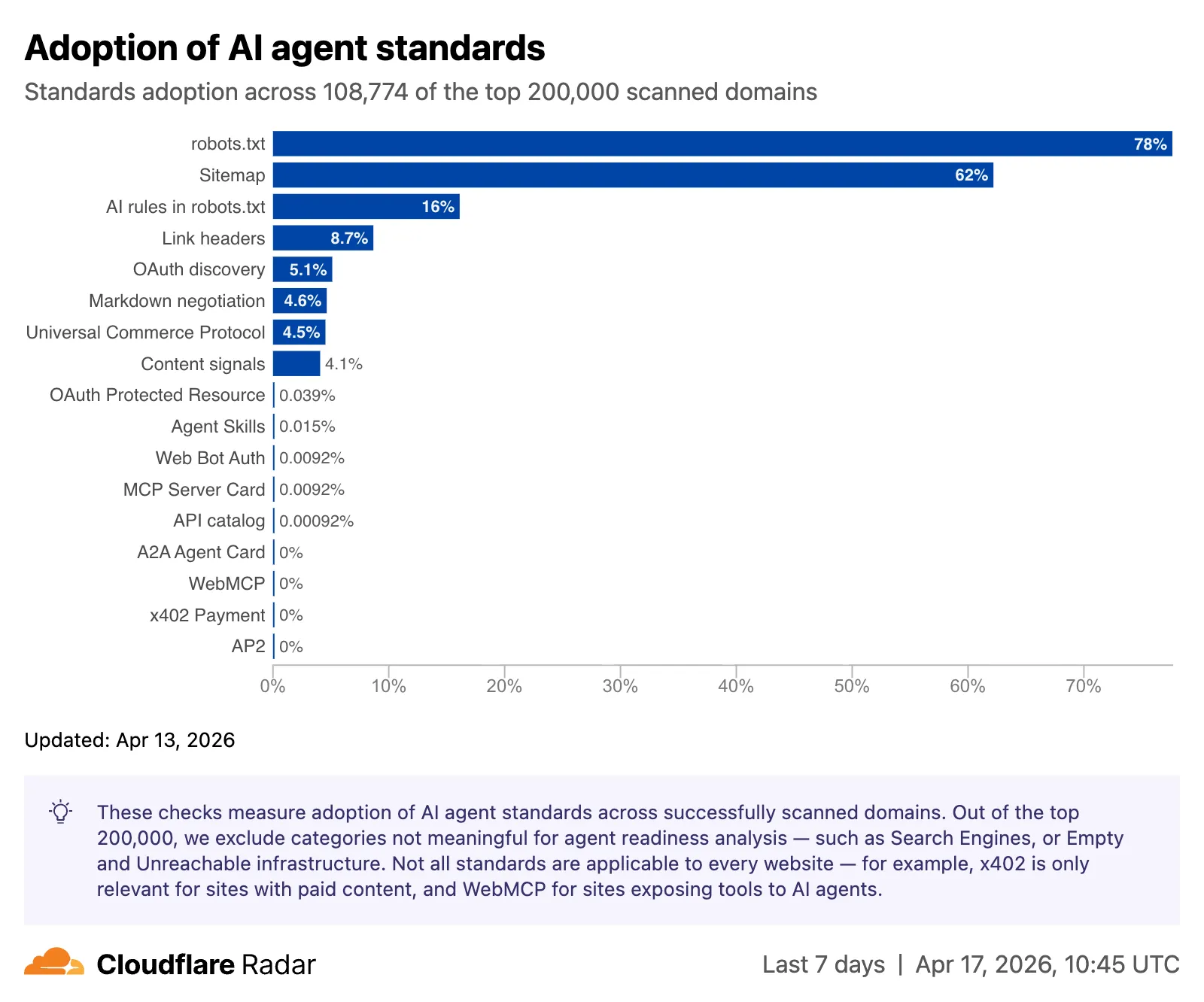
The AI Insights page now includes an adoption of AI agent standards ↗ widget that tracks how websites adopt agent-facing standards. The data is filterable by domain category and updated weekly on Mondays. This data is also available through the Agent Readiness API reference.
URL Scanner ↗ reports now include an Agent readiness tab that evaluates a scanned URL against the criteria used by the Agent Readiness score tool ↗.
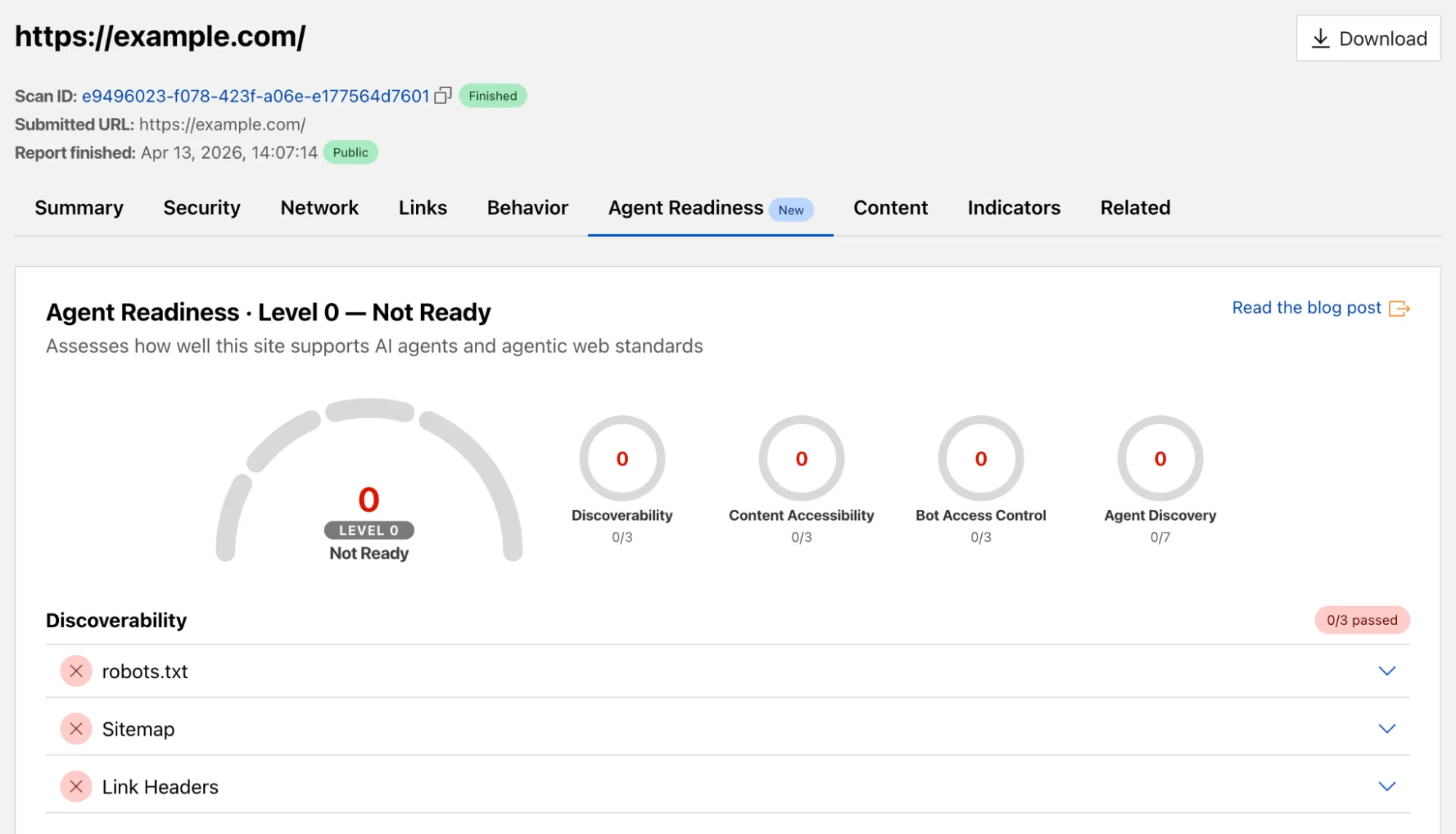
For more details, refer to the Agent Readiness blog post ↗.
A new savings gauge ↗ shows the median response-size reduction when serving Markdown instead of HTML to AI bots and crawlers. This highlights the bandwidth and token savings that Markdown for Agents provides.
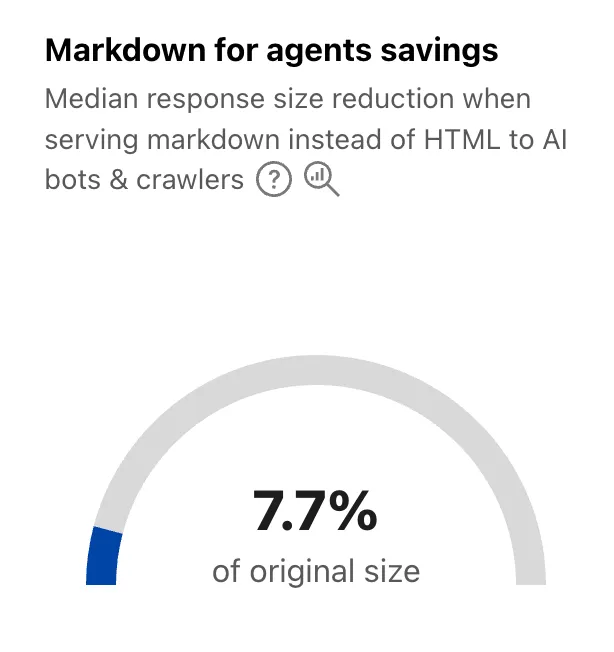
For more details, refer to the Markdown for Agents API reference.
The new response status widget ↗ displays the distribution of HTTP response status codes returned to AI bots and crawlers. Results are groupable by individual status code (200, 403, 404) or by category (2xx, 3xx, 4xx, 5xx).
The same widget is available on each verified bot's detail page (only available for AI bots), for example Google ↗.
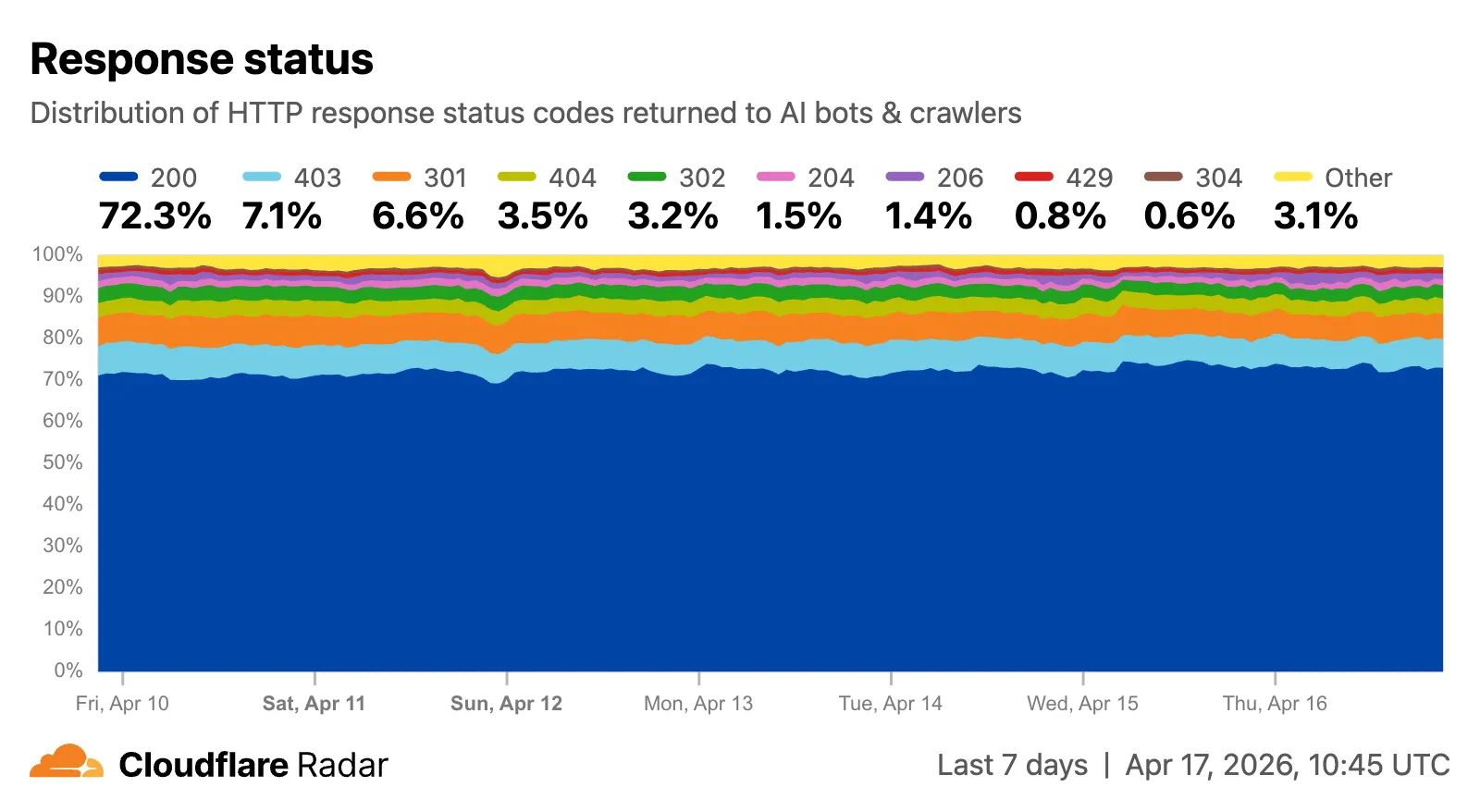
Explore all three features on the Cloudflare Radar AI Insights ↗ page.
New AI Search instances created after today will work differently. New instances come with built-in storage and a vector index, so you can upload a file, have it indexed immediately, and search it right away.
Additionally new Workers Bindings are now available to use with AI Search. The new namespace binding lets you create and manage instances at runtime, and cross-instance search API lets you query across multiple instances in one call.
All new instances now comes with built-in storage which allows you to upload files directly to it using the Items API or the dashboard. No R2 buckets to set up, no external data sources to connect first.
TypeScript const instance = env.AI_SEARCH.get("my-instance");// upload and wait for indexing to completeconst item = await instance.items.uploadAndPoll("faq.md", content);// search immediately after indexingconst results = await instance.search({messages: [{ role: "user", content: "onboarding guide" }],});The new
ai_search_namespacesbinding replaces the previousenv.AI.autorag()API provided through theAIbinding. It gives your Worker access to all instances within a namespace and lets you create, update, and delete instances at runtime without redeploying.JSONC // wrangler.jsonc{"ai_search_namespaces": [{"binding": "AI_SEARCH","namespace": "default",},],}TypeScript // create an instance at runtimeconst instance = await env.AI_SEARCH.create({id: "my-instance",});For migration details, refer to Workers binding migration. For more on namespaces, refer to Namespaces.
Within the new AI Search binding, you now have access to a Search and Chat API on the namespace level. Pass an array of instance IDs and get one ranked list of results back.
TypeScript const results = await env.AI_SEARCH.search({messages: [{ role: "user", content: "What is Cloudflare?" }],ai_search_options: {instance_ids: ["product-docs", "customer-abc123"],},});Refer to Namespace-level search for details.
AI Search now supports hybrid search and relevance boosting, giving you more control over how results are found and ranked.
Hybrid search combines vector (semantic) search with BM25 keyword search in a single query. Vector search finds chunks with similar meaning, even when the exact words differ. Keyword search matches chunks that contain your query terms exactly. When you enable hybrid search, both run in parallel and the results are fused into a single ranked list.
You can configure the tokenizer (
porterfor natural language,trigramfor code), keyword match mode (andfor precision,orfor recall), and fusion method (rrformax) per instance:TypeScript const instance = await env.AI_SEARCH.create({id: "my-instance",index_method: { vector: true, keyword: true },fusion_method: "rrf",indexing_options: { keyword_tokenizer: "porter" },retrieval_options: { keyword_match_mode: "and" },});Refer to Search modes for an overview and Hybrid search for configuration details.
Relevance boosting lets you nudge search rankings based on document metadata. For example, you can prioritize recent documents by boosting on
timestamp, or surface high-priority content by boosting on a custom metadata field likepriority.Configure up to 3 boost fields per instance or override them per request:
TypeScript const results = await env.AI_SEARCH.get("my-instance").search({messages: [{ role: "user", content: "deployment guide" }],ai_search_options: {retrieval: {boost_by: [{ field: "timestamp", direction: "desc" },{ field: "priority", direction: "desc" },],},},});Refer to Relevance boosting for configuration details.
Artifacts is now in private beta. Artifacts is Git-compatible storage built for scale: create tens of millions of repos, fork from any remote, and hand off a URL to any Git client. It provides a versioned filesystem for storing and exchanging file trees across Workers, the REST API, and any Git client, running locally or within an agent.
You can read the announcement blog ↗ to learn more about what Artifacts does, how it works, and how to create repositories for your agents to use.
Artifacts has three API surfaces:
- Workers bindings (for creating and managing repositories)
- REST API (for creating and managing repos from any other compute platform)
- Git protocol (for interacting with repos)
As an example: you can use the Workers binding to create a repo and read back its remote URL:
TypeScript # Create a thousand, a million or ten million repos: one for every agent, for every upstream branch, or every user.const created = await env.PROD_ARTIFACTS.create("agent-007");const remote = (await created.repo.info())?.remote;Or, use the REST API to create a repo inside a namespace from your agent(s) running on any platform:
Terminal window curl --request POST "https://artifacts.cloudflare.net/v1/api/namespaces/some-namespace/repos" --header "Authorization: Bearer $CLOUDFLARE_API_TOKEN" --header "Content-Type: application/json" --data '{"name":"agent-007"}'Any Git client that speaks smart HTTP can use the returned remote URL:
Terminal window # Agents know git.# Every repository can act as a git repo, allowing agents to interact with Artifacts the way they know best: using the git CLI.git clone https://x:${REPO_TOKEN}@artifacts.cloudflare.net/some-namespace/agent-007.gitTo learn more, refer to Get started, Workers binding, and Git protocol.
Workflows limits have been raised to the following:
Limit Previous New Concurrent instances (running in parallel) 10,000 50,000 Instance creation rate (per account) 100/second per account 300/second per account, 100/second per workflow Queued instances per Workflow 1 1 million 2 million These increases apply to all users on the Workers Paid plan. Refer to the Workflows limits documentation for more details.
-
Queued instances are instances that have been created or awoken and are waiting for a concurrency slot. ↩
-
We are renaming Browser Rendering to Browser Run. The name Browser Rendering never fully captured what the product does. Browser Run lets you run full browser sessions on Cloudflare's global network, drive them with code or AI, record and replay sessions, crawl pages for content, debug in real time, and let humans intervene when your agent needs help.
Along with the rename, we have increased limits for Workers Paid plans and redesigned the Browser Run dashboard.
We have 4x-ed concurrency limits for Workers Paid plan users:
- Concurrent browsers per account: 30 → 120 per account
- New browser instances: 30 per minute → 1 per second
- REST API rate limits: recently increased from 3 to 10 requests per second
Rate limits across the limits page are now expressed in per-second terms, matching how they are enforced. No action is needed to benefit from the higher limits.
The redesigned dashboard ↗ now shows every request in a single Runs tab, not just browser sessions but also quick actions like screenshots, PDFs, markdown, and crawls. Filter by endpoint, view target URLs, status, and duration, and expand any row for more detail.
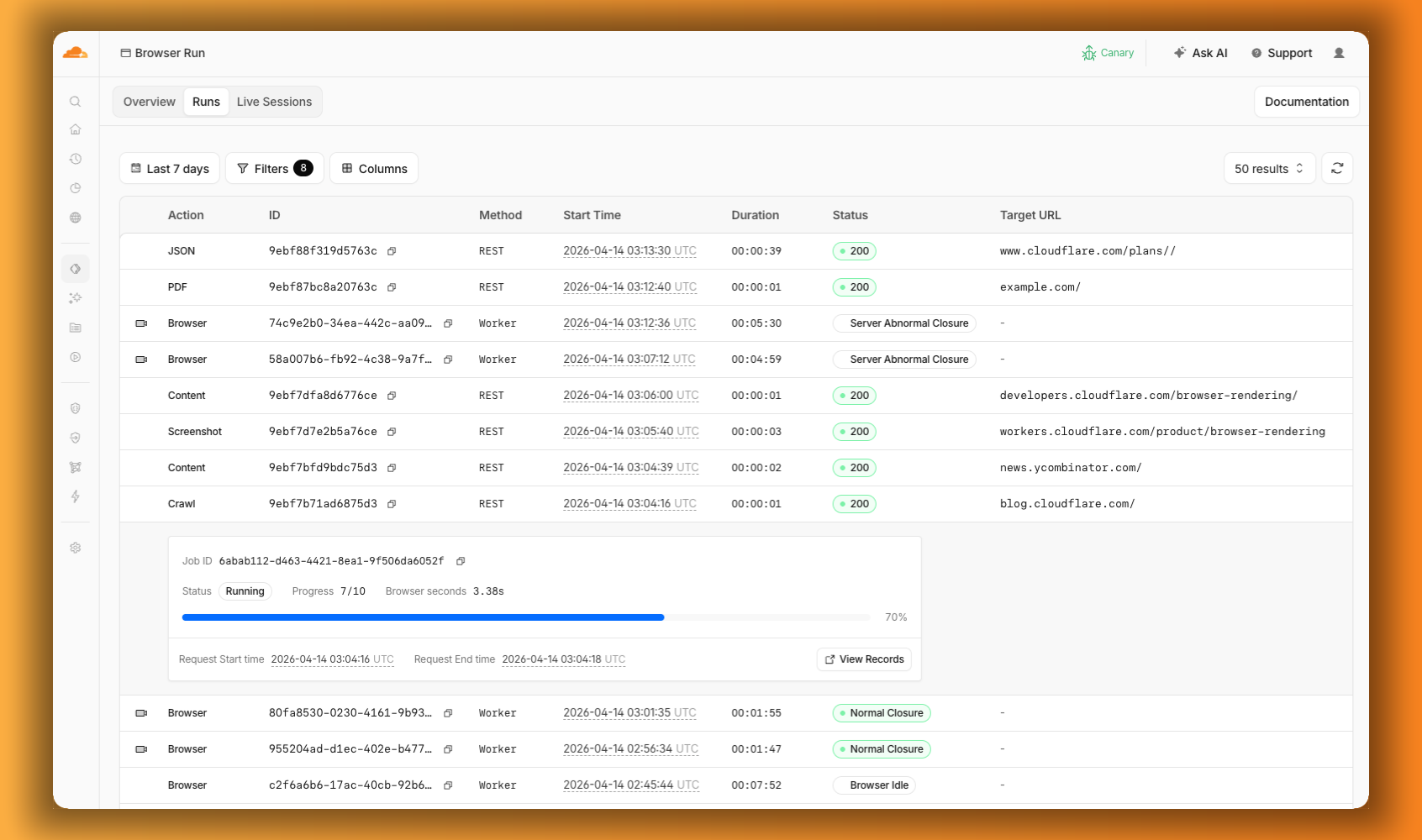
We are also shipping several new features:
- Live View, Human in the Loop, and Session Recordings - See what your agent is doing in real time, let humans step in when automation hits a wall, and replay any session after it ends.
- WebMCP - Websites can expose structured tools for AI agents to discover and call directly, replacing slow screenshot-analyze-click loops.
For the full story, read our Agents Week blog Browser Run: Give your agents a browser ↗.
When browser automation fails or behaves unexpectedly, it can be hard to understand what happened. We are shipping three new features in Browser Run (formerly Browser Rendering) to help:
- Live View for real-time visibility
- Human in the Loop for human intervention
- Session Recordings for replaying sessions after they end
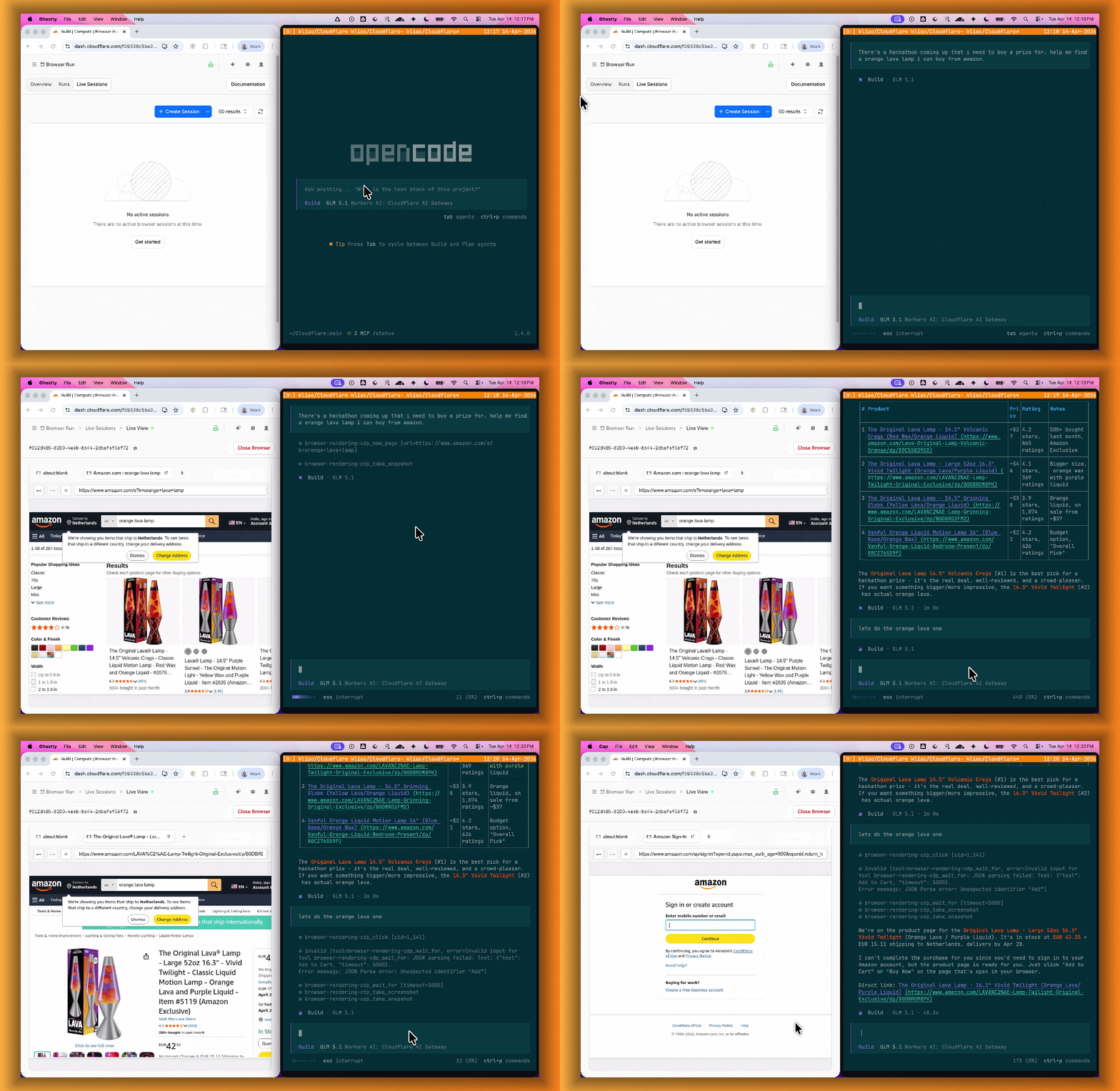
Live View lets you see what your agent is doing in real time. The page, DOM, console, and network requests are all visible for any active browser session. Access Live View from the Cloudflare dashboard, via the hosted UI at
live.browser.run, or using native Chrome DevTools.When your agent hits a snag like a login page or unexpected edge case, it can hand off to a human instead of failing. With Human in the Loop, a human steps into the live browser session through Live View, resolves the issue, and hands control back to the script.
Today, you can step in by opening the Live View URL for any active session. Next, we are adding a handoff flow where the agent can signal that it needs help, notify a human to step in, then hand control back to the agent once the issue is resolved.
Session Recordings records DOM state so you can replay any session after it ends. Enable recordings by passing
recording: truewhen launching a browser. After the session closes, view the recording in the Cloudflare dashboard under Browser Run > Runs, or retrieve via API using the session ID. Next, we are adding the ability to inspect DOM state and console output at any point during the recording.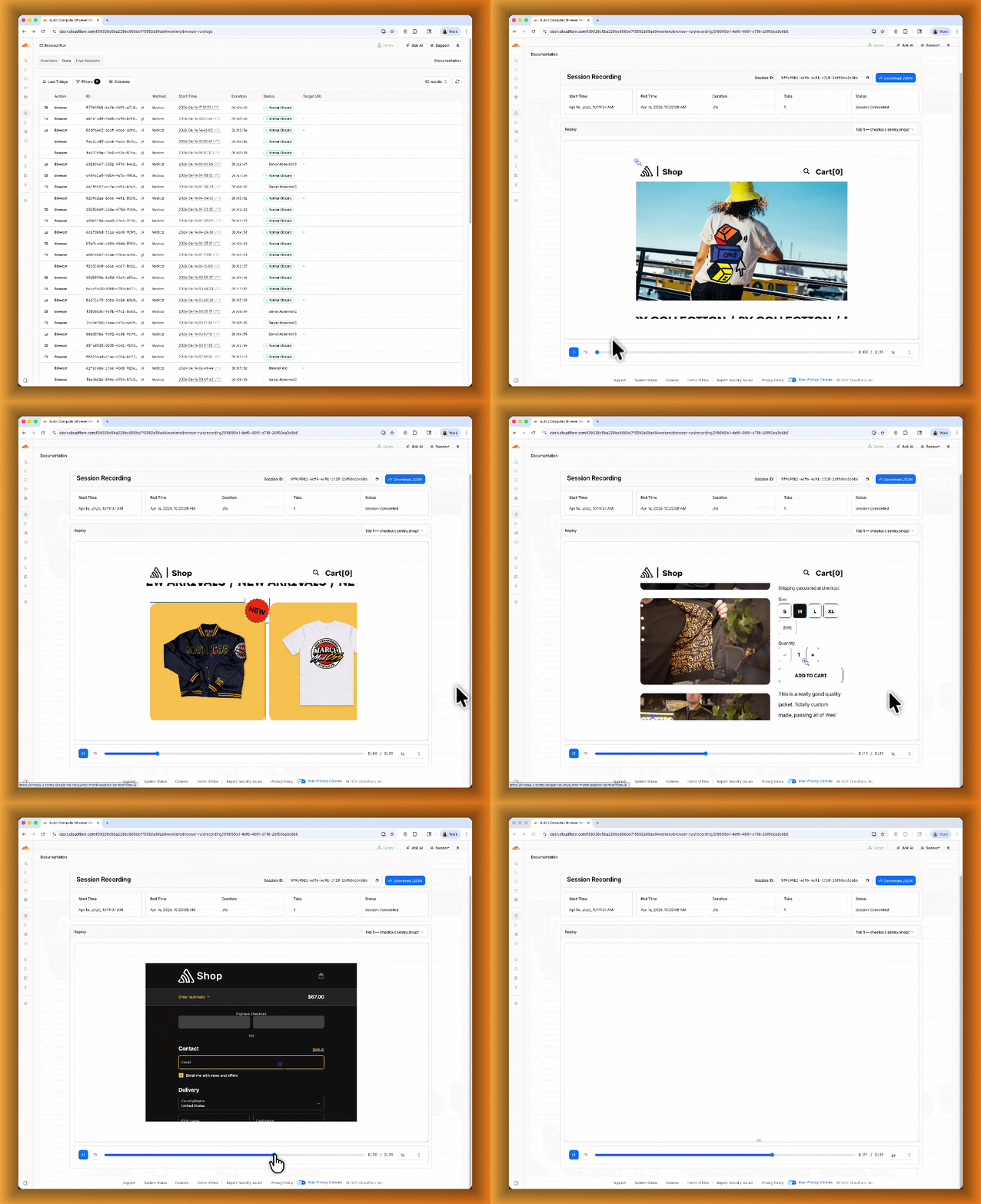
To get started, refer to the documentation for Live View, Human in the Loop, and Session Recording.
Browser Run (formerly Browser Rendering) now supports WebMCP ↗ (Web Model Context Protocol), a new browser API from the Google Chrome team.
The Internet was built for humans, so navigating as an AI agent today is unreliable. WebMCP lets websites expose structured tools for AI agents to discover and call directly. Instead of slow screenshot-analyze-click loops, agents can call website functions like
searchFlights()orbookTicket()with typed parameters, making browser automation faster, more reliable, and less fragile.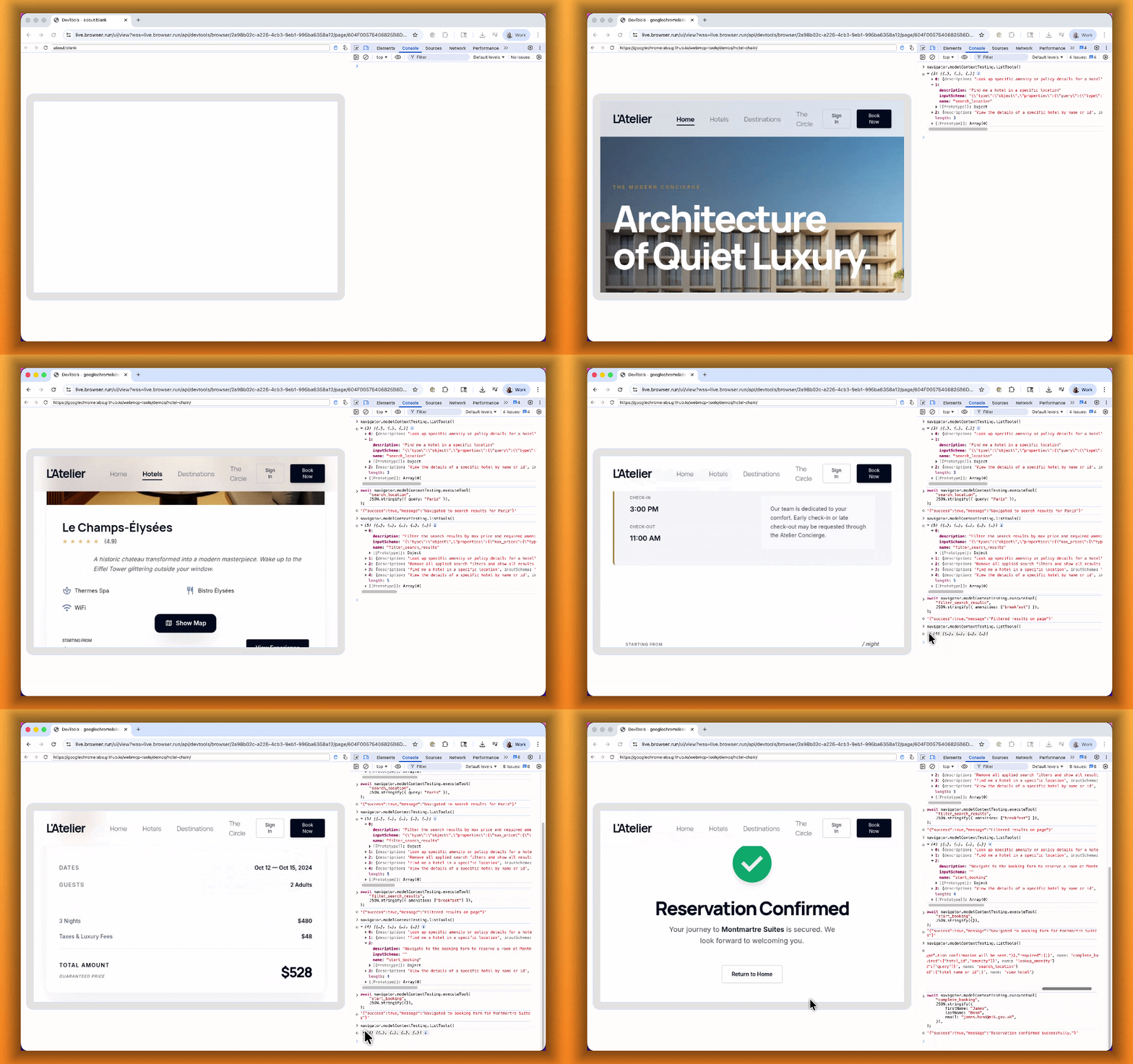
With WebMCP, you can:
- Discover website tools - Use
navigator.modelContextTesting.listTools()to see available actions on any WebMCP-enabled site - Execute tools directly - Call
navigator.modelContextTesting.executeTool()with typed parameters - Handle human-in-the-loop interactions - Some tools pause for user confirmation before completing sensitive actions
WebMCP requires Chrome beta features. We have an experimental pool with browser instances running Chrome beta so you can test emerging browser features before they reach stable Chrome. To start a WebMCP session, add
lab=trueto your/devtools/browserrequest:Terminal window curl -X POST "https://api.cloudflare.com/client/v4/accounts/{account_id}/browser-rendering/devtools/browser?lab=true&keep_alive=300000" \-H "Authorization: Bearer {api_token}"Combined with the recently launched CDP endpoint, AI agents can also use WebMCP. Connect an MCP client to Browser Run via CDP, and your agent can discover and call website tools directly. Here's the same hotel booking demo, this time driven by an AI agent through OpenCode:
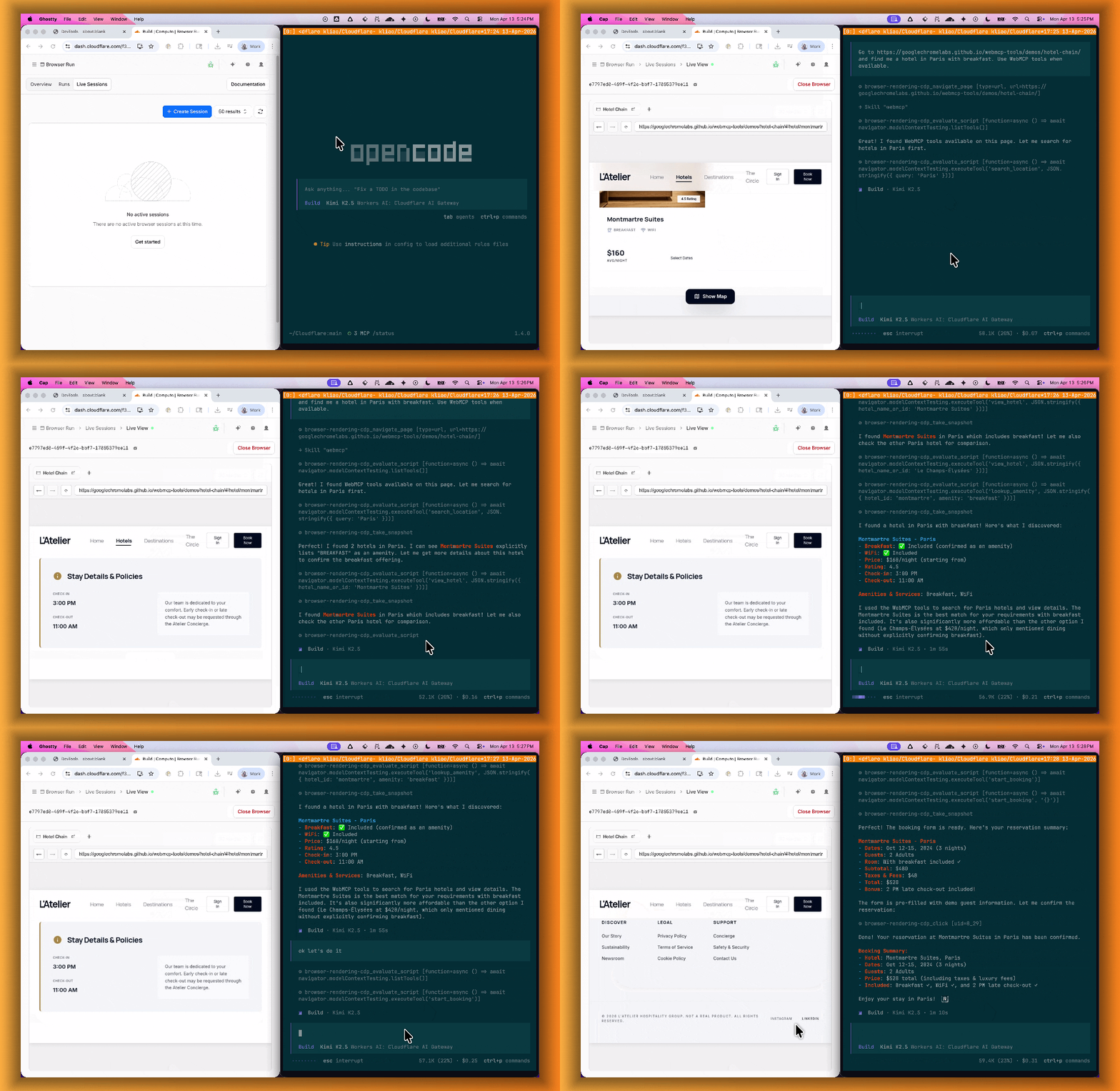
For a step-by-step guide, refer to the WebMCP documentation.
- Discover website tools - Use
Cloudflare Access now supports independent multi-factor authentication (MFA), allowing you to enforce MFA requirements without relying on your identity provider (IdP). With per-application and per-policy configuration, you can enforce stricter authentication methods like hardware security keys on sensitive applications without requiring them across your entire organization. This reduces the risk of MFA fatigue for your broader user population while adding additional security where it matters most.
This feature also addresses common gaps in IdP-based MFA, such as inconsistent MFA policies across different identity providers or the need for additional security layers beyond what the IdP provides.
Independent MFA supports the following authenticator types:
- Authenticator application — Time-based one-time passwords (TOTP) using apps like Google Authenticator, Microsoft Authenticator, or Authy.
- Security key — Hardware security keys such as YubiKeys.
- Biometrics — Built-in device authenticators including Apple Touch ID, Apple Face ID, and Windows Hello.
You can configure MFA requirements at three levels:
Level Description Organization Enforce MFA by default for all applications in your account. Application Require or turn off MFA for a specific application. Policy Require or turn off MFA for users who match a specific policy. Settings at lower levels (policy) override settings at higher levels (organization), giving you granular control over MFA enforcement.
Users enroll their authenticators through the App Launcher. To help with onboarding, administrators can share a direct enrollment link:
<your-team-name>.cloudflareaccess.com/AddMfaDevice.To get started with Independent MFA, refer to Independent MFA.
-
We are excited to announce two major capability upgrades for Agent Lee, the AI co-pilot built directly into the Cloudflare dashboard. Agent Lee is designed to understand your specific account configuration, and with this release, it moves from a passive advisor to an active assistant that can help you manage your infrastructure and visualize your data through natural language.
Agent Lee can now perform changes on your behalf across your Cloudflare account. Whether you need to update DNS records, modify SSL/TLS settings, or configure Workers routes, you can simply ask.
To ensure security and accuracy, every write operation requires explicit user approval. Before any change is committed, Agent Lee will present a summary of the proposed action in plain language. No action is taken until you select Confirm, and this approval requirement is enforced at the infrastructure level to prevent unauthorized changes.
Example requests:
- "Add an A record for blog.example.com pointing to 192.0.2.10."
- "Enable Always Use HTTPS on my zone."
- "Set the SSL mode for example.com to Full (strict)."
Understanding your traffic and security trends is now as easy as asking a question. Agent Lee now features Generative UI, allowing it to render inline charts and structured data visualizations directly within the chat interface using your actual account telemetry.
Example requests:
- "Show me a chart of my traffic over the last 7 days."
- "What does my error rate look like for the past 24 hours?"
- "Graph my cache hit rate for example.com this week."
These features are currently available in Beta for all users on the Free plan. To get started, log in to the Cloudflare dashboard ↗ and select Ask AI in the upper right corner.
To learn more about how to interact with your account using AI, refer to the Agent Lee documentation.